
CertiChain: Blockchain Student Academic Records Keeping
This project is a decentralized academic record management system that leverages blockchain technology to securely store and verify student transcripts and certificates. The platform allows universities to upload and manage academic records, while students can access their transcripts using unique credentials.
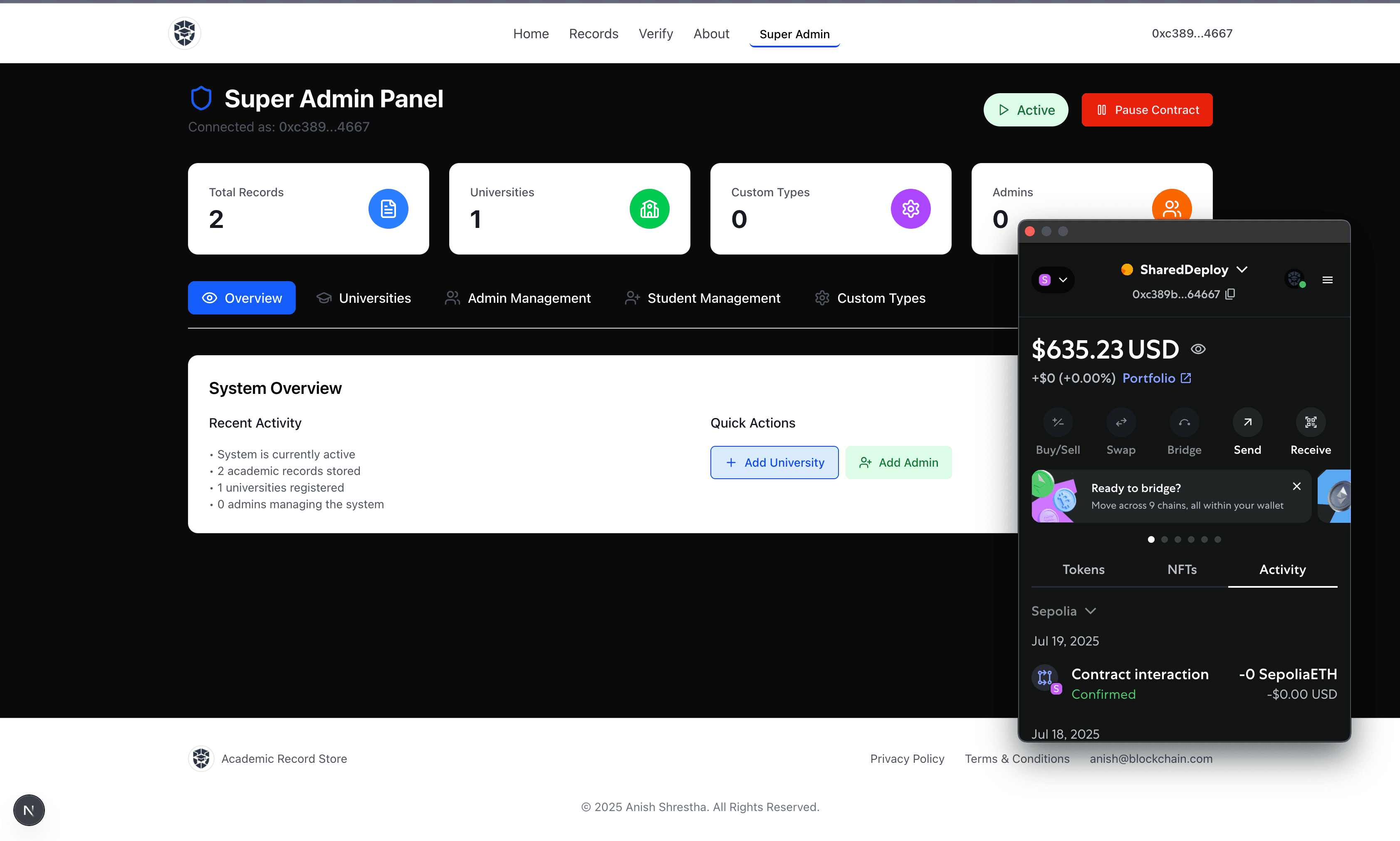
🎓 CertiChain: Decentralized Academic Records Management System
✨ Overview
CertiChain is a cutting-edge decentralized application (dApp) designed to revolutionize academic record management. By leveraging blockchain technology, it provides a secure, transparent, and immutable platform for universities to issue and manage academic records, and for students to access and share their credentials. This system eliminates the risks of tampering and fraud associated with traditional paper-based or centralized digital systems.
Complete Documentation
🚀 Features
- Immutable Records: All academic records are stored on the Ethereum blockchain, ensuring tamper-proof and permanent preservation.
- Secure Access: Students gain secure, credential-based access to their academic records.
- Efficient Verification: Authorized parties can easily and reliably verify academic records, streamlining processes for employers, other educational institutions, and more. [Feature in progress]
- University Management: Universities can seamlessly upload, manage, and update student records.
- Role-Based Access Control (RBAC): A robust permission system differentiates between Super Admins, Admins, Universities, and Students, ensuring secure and appropriate access to functionalities.
- IPFS Integration: Document content (e.g., transcripts, certificates) is stored on IPFS via Pinata, with only the cryptographic hash recorded on-chain, ensuring data integrity and privacy.
💡 Architecture
CertiChain follows a full-stack dApp architecture:
-
Smart Contracts (Blockchain Layer):
- AcademicRecords.sol: The core contract for managing academic records. It handles adding, retrieving, sharing, and unsharing records.
- RoleManager.sol: Manages different user roles (Super Admin, Admin, University) and their permissions using OpenZeppelin's
AccessControl. - RecordStorage.sol: A library contract responsible for the storage and manipulation of
RecordandCustomRecordTypedata structures. - StudentManagement.sol: Manages the mapping between student IDs and their blockchain addresses, facilitating student registration and lookup.
-
Frontend (Application Layer):
- Built with Next.js, React, and TailwindCSS for a modern, responsive user interface.
- Interacts with the blockchain via
ethers.jsand theBlockchainService. - Handles file uploads to IPFS via a dedicated API route (
/api/upload). - Provides distinct dashboards and functionalities for different user roles.
-
IPFS Integration (Storage Layer):
- Uses Pinata as an IPFS pinning service to ensure reliable storage and retrieval of academic documents.
src/lib/pinata.tsprovides client-side utility for constructing IPFS gateway URLs.src/app/api/upload/route.tshandles secure, server-side uploads to Pinata using environment variables for API keys.
🛠️ Technology Stack
- Frontend: Next.js, React, TailwindCSS
- Blockchain: Ethereum, Solidity, Hardhat, OpenZeppelin Contracts
- Web3 Library: Ethers.js
- IPFS Service: Pinata
- HTTP Client: Axios
- Environment Management:
dotenv
⚙️ Setup and Installation
Follow these steps to get CertiChain up and running on your local machine.
Prerequisites
- Node.js (v18 or higher)
- npm or Yarn
- Git
- MetaMask browser extension
- A Pinata account and API keys
1. Clone the Repository
git clone https://github.com/Anish713/Academic-record-keeping.git
cd Academic-record-keeping
2. Install Dependencies
Install both the frontend and blockchain project dependencies:
npm install
cd blockchain
npm install
cd ..
3. Environment Configuration
Create a .env.local file in the root directory of the project based on example.env and fill in your details. This file will store sensitive API keys and contract addresses.
# Pinata API Keys (Server-side access only)
PINATA_API_KEY=YOUR_PINATA_API_KEY
PINATA_API_SECRET_KEY=YOUR_PINATA_API_SECRET_KEY

# Pinata Gateway URL (Client-side access)
NEXT_PUBLIC_PINATA_GATEWAY_URL=https://gateway.pinata.cloud

# Deployed Smart Contract Addresses (Update after deployment)
NEXT_PUBLIC_CONTRACT_ADDRESS=YOUR_ACADEMIC_RECORDS_CONTRACT_ADDRESS
NEXT_PUBLIC_STUDENT_MANAGEMENT_CONTRACT_ADDRESS=YOUR_STUDENT_MANAGEMENT_CONTRACT_ADDRESS
4. Deploy Smart Contracts
Navigate to the blockchain directory and deploy the contracts to your preferred Ethereum network (e.g., Hardhat Local Network, Sepolia, Goerli).
cd blockchain
npx hardhat compile
npx hardhat run scripts/deploy.ts --network localhost # or your chosen network
After successful deployment, update the NEXT_PUBLIC_CONTRACT_ADDRESS and NEXT_PUBLIC_STUDENT_MANAGEMENT_CONTRACT_ADDRESS in your root .env.local file with the deployed addresses.
5. Run the Application
Return to the root directory and start the Next.js development server:
npm run dev
The application will be accessible at http://localhost:3000.
🤝 Contributing
Contributions are welcome! Please feel free to submit issues, pull requests, or suggest improvements.
📄 License
This project is licensed under the MIT License. See the LICENSE file for details.
📞 Contact
For any inquiries, please contact via https://shresthaanish9703.com.np/.