
Samsung SDK vs Android Sensor Manager: A Comprehensive Comparison for Health & Sensor Tracking
As wearable technology advances, choosing the right smartwatch for health monitoring is crucial. Samsung Galaxy Watches and Google Pixel Watches offer distinct advantages, especially for developers leveraging their respective SDKs. This article explores their differences, particularly in sensor capabilities, SDK support, and health-tracking functionalities.
Samsung SDK and Its Capabilities
Medium Article: https://medium.com/@shresthaanish9703/samsung-sdk-vs-android-sensor-manager-a-comprehensive-comparison-for-health-sensor-tracking-d42b79f2375a
Partnership with Samsung
To use the Samsung SDK in a release build, developers must establish a partnership with Samsung. The partnership application can be submitted through their official portal: Samsung Health Partner.
Sensor Support in Samsung SDK
Samsung’s SDK provides access to essential health-related sensor data. However, it has several constraints:
- It is exclusively compatible with Samsung Galaxy Watches.
- A physical Samsung Galaxy Watch is required for testing as the SDK does not support emulation.
- Developers must use the specified sampling frequencies as custom frequencies are not permitted.
- More details on Samsung’s sensor data specifications can be found here.
Key Findings in Health Tracking
- SpO2 Measurement
- Continuous movement can hinder SpO2 measurement.
- Each SpO2 reading takes an average of 30 seconds (1/30 Hz), subject to user stability.
- Battery consumption for SpO2 measurement remains uncertain.
- PPG Data and Heart Rate Variability (HRV)
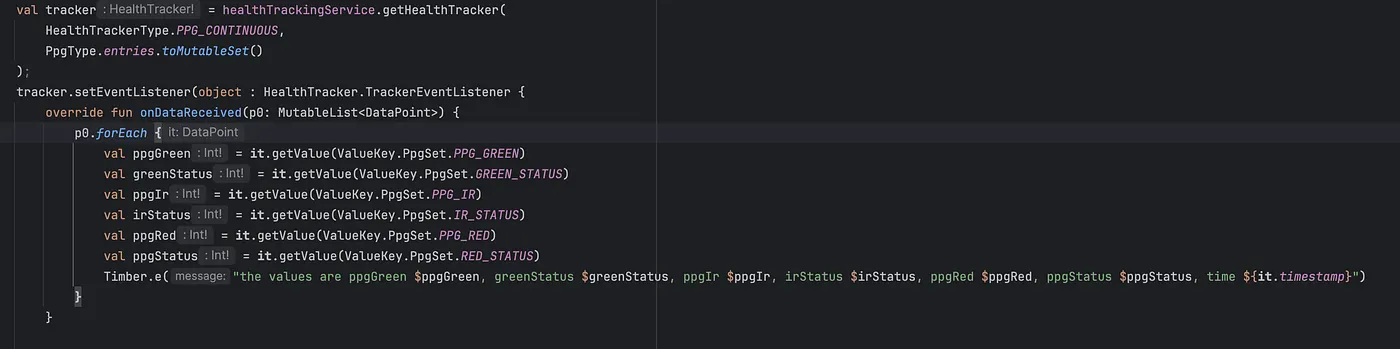
- Samsung SDK provides continuous PPG monitoring at a fixed 25Hz frequency.
- Raw PPG values include Green, IR, and Red sensor data.
- Researchers can derive HRV by utilizing interbeat interval (IBI) data available through the Samsung SDK.
- The heart rate can be obtained at a 1Hz frequency.
Sample PPG readings from the Samsung SDK:

Sample PPG Readings from Samsung SDK
ppgGreen -216048, greenStatus 0, ppgIr 4780576, irStatus 0, ppgRed 2392269, ppgStatus 0, time 1740476752841 ppgGreen -215345, greenStatus 0, ppgIr 4780824, irStatus 0, ppgRed 2392191, ppgStatus 0, time 1740476753841
- Respiratory Rate Estimation
- PPG sensor data can be used to estimate respiratory rate.
- Research references:
- National Center for Biotechnology Information
- Nature Digital Medicine
Comparison Between Samsung Galaxy Watch (Samsung SDK) and Pixel Watch 3 (WearOS)
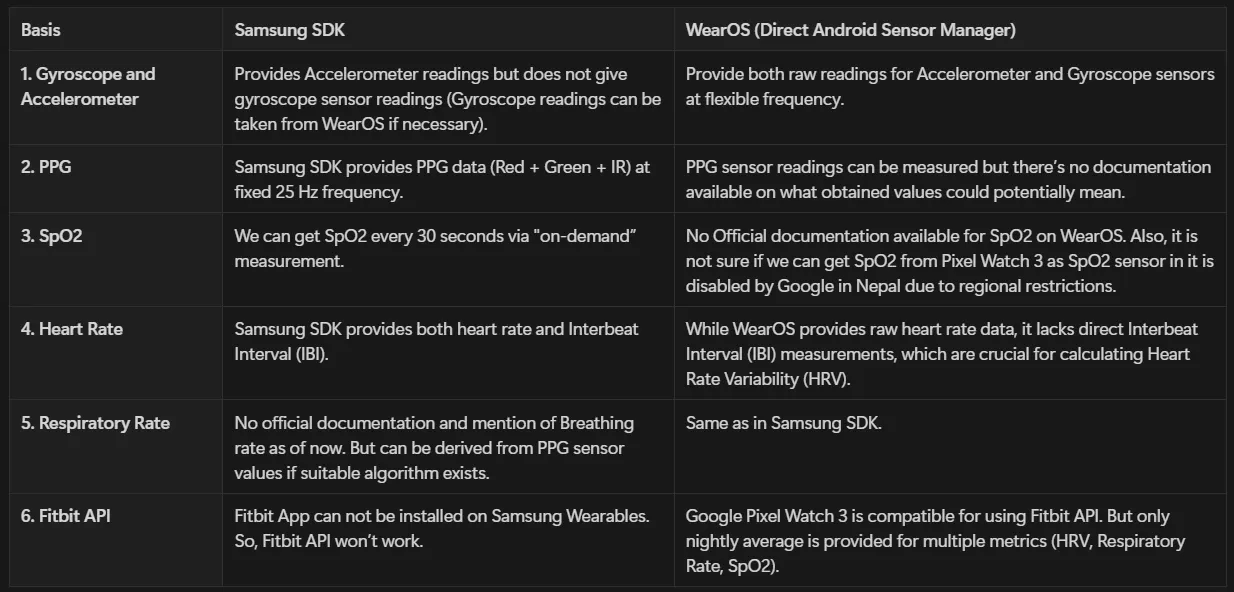
Which Smartwatch is Better for Health Monitoring?
- For developers and researchers, the Samsung Galaxy Watch is a better choice due to its structured SDK, direct access to IBI for HRV calculations, and detailed PPG data.
- For general users, Pixel Watch 3 offers Fitbit API integration but lacks real-time HRV and SpO2 capabilities, making it less suitable for continuous monitoring.
- If you need more customization on sampling frequency then, Android Sensor Manager is the way to go.
Conclusion
When choosing a smartwatch for health tracking and research, the Samsung Galaxy Watch provides superior SDK access and structured sensor data. However, Google’s Pixel Watch 3 or WearOS Android Sensor Manager offers flexibility through Fitbit API integration. Understanding these differences can help developers and researchers select the most appropriate device for their needs. Nevertheless, as long as Samsung operates on WearOS, one can utilize the Android Sensor Manager alongside the Samsung SDK.
For official resources and technical specifications, refer to:
- Samsung Health SDK
- Google’s WearOS Documentation
By carefully assessing the strengths and limitations of both devices, developers can build more efficient and accurate health-tracking applications.