
Mastering Kotlin Coroutines: A Friendly, Deep Dive Into Concurrency with Real-World Insights
Kotlin Coroutines: Lightweight Concurrency for Modern Android
Working with threads in Android (or any JVM app) can feel clunky and heavy. Spawning threads is like launching heavyweight rockets — it gets the job done but can quickly exhaust resources.
Enter Kotlin coroutines: a modern, lightweight way to write asynchronous code that feels sequential. *A coroutine is “an instance of a suspendable computation” *[kotlinlang.org].
In plain English, coroutines let you write code that looks synchronous (step-by-step) but actually does non-blocking work under the hood.
They’re often described as “lightweight threads” because, unlike full JVM threads, they don’t tie up an OS thread when waiting. This means you can launch tens of thousands of coroutines without crashing your app — something that would be impossible with regular threads.
Why care?
Imagine you need to fetch user data from a network and then update the UI. With coroutines, you can write that logic in a straight line. You suspend when calling the network, and the main thread isn’t frozen. Underneath, the Kotlin runtime takes care of pausing the work and resuming it later on any available thread.
Let’s dive in and see how coroutines work, why they’re so powerful, and how to use them in Kotlin (with some comparisons to the familiar JavaScript async/await style).
Coroutines vs Threads
Traditionally, concurrency in Java/Kotlin meant creating threads. For example:
fun main() {
    val thread = Thread {
        Thread.sleep(1000)
        println("Done in thread: ${Thread.currentThread().name}")
    }
    thread.start()
    println("Main thread: ${Thread.currentThread().name}")
}
This prints something like “Main thread: main” then “Done in thread: Thread-0”. It works, but each Thread is a heavy object with its own stack and OS scheduling overhead. If you try to launch 100,000 threads, the program will likely crash with OutOfMemoryError. In contrast, coroutines are so lightweight that a Kotlin tutorial famously launches 50,000 coroutines in a single runBlocking block, each delaying and printing a dot after 5 seconds. The code is short.
import kotlinx.coroutines.*

fun main() = runBlocking {
    repeat(50_000) { // launch a lot of coroutines
        launch {
            delay(5000L)
            print(".")
        }
    }
}
Coroutines let the system hide all the heavy lifting of scheduling. The language and standard libraries make it super convenient to create coroutines, and the Kotlin runtime scheduling hides the complexities of managing concurrent coroutines. In practice, this means you can’t overload an app with coroutines the way you can with raw threads.
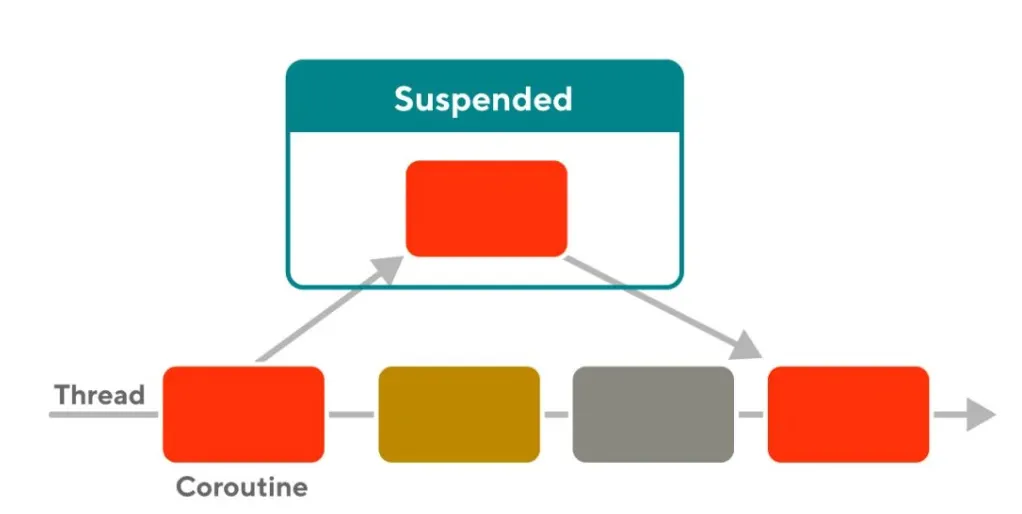
Another key difference is how waiting is handled. With threads, calling Thread.sleep(1000) blocks that thread — it sits idle doing nothing. With coroutines, calling delay(1000) suspends the coroutine, not the thread [kotlinlang.org]. The underlying thread is freed up to do other work. In effect, coroutines turn waiting into opportunities to do useful work elsewhere. This is illustrated below: when one coroutine suspends (e.g. waiting for I/O), the Kotlin scheduler moves it off the thread and picks up another coroutine on that thread.
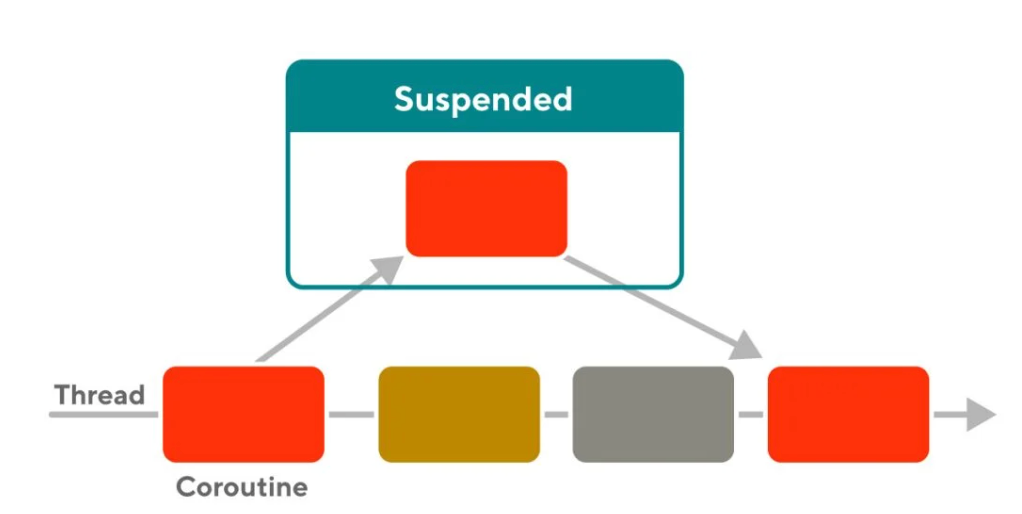 Figure: Coroutines on threads. When a coroutine suspends (like waiting for data), the scheduler removes it from the thread and runs another coroutine instead
In the diagram, notice a coroutine marked “Suspended” (perhaps waiting for a network response). The thread doesn’t sit idle — it immediately starts executing a different coroutine. This is why coroutines can appear to run concurrently even on a single thread (they switch in and out at suspension points). In a sense, coroutines and threads both enter “waiting” states, but coroutines make this process lightweight and cooperative.
Key Advantages of Coroutines
When you start using coroutines, a few big wins become obvious:
-
Structured Concurrency: Coroutines live in scopes that automatically manage their lifecycle. You can’t accidentally forget to wait for a coroutine to finish, because its parent scope won’t complete until all children do. This avoids “floating” coroutines and resource leaks. In practice, we often use runBlocking or coroutineScope to define a block of coroutines that must all finish together. (Kotlin’s docs stress that “an outer scope cannot complete until all its children coroutines complete”.)
-
Lightweight: You can spin up thousands of coroutines with very little overhead. They’re basically objects managed by Kotlin’s runtime, not full OS threads. This means you can fire off massive parallel work (like processing large collections or handling many I/O streams) without bogging down the system.
-
Non-blocking suspension: Coroutines can pause work without blocking threads. Functions marked suspend (or calls like delay()) tell the coroutine to yield, allowing other coroutines to run. This keeps e.g. the UI thread responsive. The coroutine will automatically resume later (even on a different thread) once the work is ready to continue.
-
Sequential style: You write code in a normal linear fashion, but it doesn’t block. For example, instead of nesting callbacks, you can simply await or call suspend functions one after another. This reads cleanly, akin to JavaScript’s async/await. In fact, conceptually Kotlin’s async { ... }.await() is analogous to JavaScript’s asyncFunc().then(...) or await pattern. Under the hood, Kotlin implements suspend functions via state machines, much like how JS engines handle async/await. (Don’t worry – you don’t have to write the state machine, Kotlin does it for you.)
-
Built-in cancellation and error handling: Coroutines have a cooperative cancellation mechanism. You can cancel a coroutine’s Job, and it will throw a CancellationException at the next suspension point. Errors in coroutines propagate cleanly through the scope: by default, if one child fails, its parent and siblings are cancelled too, preventing silent failures. You can also attach a CoroutineExceptionHandler at the top level to catch uncaught errors. (We won’t dive deep into this here, but it’s a very nice improvement over tangled try/catches in callback code.)
These advantages make coroutines lighter and friendlier than raw threads. As one Medium article puts it, “Threads are a more traditional approach, while coroutines provide a more modern and structured way to handle asynchronous operations”. Let’s see how to use them in practice.
Coroutine Builders and Scopes
To start a coroutine, you need a scope and a builder. A scope (like a CoroutineScope) defines a lifecycle for coroutines. Common scopes include runBlocking (which bridges blocking and suspend code, usually in main or tests), and Android-specific ones like viewModelScope or lifecycleScope (which tie coroutines to the lifecycle of Activities/ViewModels). In your scope, you use builders like launch or async.
-
runBlocking { … } – Runs a new coroutine and blocks the current thread until its code completes. Often used in main() or tests to let you call suspend functions from non-coroutine contexts. Inside it, the thread is blocked for waiting, but the coroutines you launch inside can still suspend independently.
-
launch { … } – Launches a new coroutine concurrently with the rest of the code in the scope. It returns a Job that can be used to cancel or join it. The code inside can delay, call suspend functions, etc. For example:
runBlocking { launch { println("Start in ${Thread.currentThread().name}") delay(500L) // suspend without blocking thread println("Resumed in ${Thread.currentThread().name}") } println("Done immediately in ${Thread.currentThread().name}") }
This will print Done immediately before the delayed message, because launch is asynchronous.
-
async { … } – Similar to launch, but returns a Deferred, which is a future-like promise of a result. You must call await() on a Deferred to get its result (and await itself is suspending and non-blocking). async is great for parallel work where you need a result back:
runBlocking { val deferred = async { // simulating long computation delay(1000) return@async 42 } println("The answer is ${deferred.await()}") }
Under the hood, a Deferred extends Job and represents a non-blocking cancellable future. The code above starts the async coroutine immediately; println will wait at await() without blocking the thread.
By default, coroutines inherit their dispatcher from the scope. In a runBlocking main, that typically means they run on the main thread, unless you specify otherwise. For example, the official docs show:
fun main() = runBlocking {
    launch {  // runs in main thread (inherited)
        println("Thread A: ${Thread.currentThread().name}")
    }
    launch(Dispatchers.Default) {  // runs in background pool
        println("Thread B: ${Thread.currentThread().name}")
    }
    launch(newSingleThreadContext("MyThread")) {
        println("Thread C: ${Thread.currentThread().name}")
    }
}
In practice you’ll see the first launch Aprints main, the second BDefaultDispatcher-worker-..., and the third CMyThread. Dispatchers like Dispatchers.IO and Dispatchers.Default let you offload I/O or CPU tasks to optimized thread pools. Note: Dispatchers.Unconfined is a special case that starts on the current thread but may resume on another (usually not needed for most apps). The key takeaway: always pick the right dispatcher.
For Android, use Dispatchers.Main (the default) for UI work, Dispatchers.IO for network/disk I/O, and Dispatchers.Default for CPU work.
Pro Tip
- Avoid GlobalScope.launch in real apps. It launches coroutines not tied to any lifecycle, so they may outlive the caller and cause leaks. Instead, use structured scopes (like viewModelScope.launch) so your coroutines cancel automatically when the scope ends.
Suspending Functions and Example
In coroutines, you can mark functions with suspend to allow them to suspend. A suspend function can only be called from another suspend function or coroutine. It’s like saying “this function may pause here and resume later”. For example:
suspend fun fetchUserData(): String {
    delay(5000) // pretend to do network I/O
    return "User Data"
}

fun main() = runBlocking {
    launch {
        println("Fetching on thread ${Thread.currentThread().name}")
        val data = fetchUserData()
        println("Got data: $data")
        println("Resuming on thread ${Thread.currentThread().name}")
    }
    println("Main continues on ${Thread.currentThread().name} while fetching...")
}
Output:
Main continues on main while fetching...
Fetching on thread main
Got data: User Data
Resuming on thread main
Even though fetchUserData() had a 5-second delay, the main thread wasn’t blocked – you could do other work (or launch more coroutines) in the meantime. This illustrates the core benefit: using delay() (or other suspend calls) means suspending the coroutine, not the thread.
Under the hood, Kotlin rewrites suspend functions into state machines. This is similar to JavaScript’s async/await: calling a suspend function is like an implicit await. In fact, it might be said for understanding that Kotlin’s async { mySuspendFunc() } corresponds to JavaScript’s myAsyncFunc(), and calling mySuspendFunc() inside Kotlin is like await myAsyncFunc(). The upshot: you get sequential-looking code, but it’s actually asynchronous, and Kotlin manages resuming it where it left off. All this happens without blocking threads, which keeps your app responsive.
Combining Work: async/await and coroutineScope
One powerful pattern is running multiple suspending tasks in parallel and then combining their results. For example, say you have two network calls: fetchUser() and fetchPosts(), each taking 5 seconds. If you do them sequentially, it’d take ~10 seconds. With coroutines, you can do:
suspend fun fetchMultiple(): Pair<String, String> = coroutineScope {
    val userDeferred = async { fetchUser() }
    val postsDeferred = async { fetchPosts() }
    // Both start in parallel
    val user = userDeferred.await()
    val posts = postsDeferred.await()
    user to posts
}

fun fetchUser(): String {
    Thread.sleep(5000)
    return "User Data"
}

fun fetchPosts(): String {
    Thread.sleep(5000)
    return "Posts Data"
}

fun main() = runBlocking {
    val (user, posts) = fetchMultiple()
    println("User: $user, Posts: $posts")
}
Here coroutineScope { ... } creates a new scope so that the function itself doesn’t return until both children complete. (Using coroutineScope instead of a simple runBlocking lets you call this from other suspend functions without blocking a thread.) The two async blocks run at the same time, and await() suspends just long enough to get each result, without wasting time. This is structured concurrency in action: the fetchMultiple function waits until all its child coroutines (and their work) are done before returning. If either network call fails with an exception, both will be cancelled (so you won’t have one hanging around), and the exception will bubble up.
Channels: Coroutine Communication
Sometimes you have one coroutine producing a stream of data and another consuming it. Kotlin’s channels are like queues for coroutines. You can send values into a channel from one coroutine and receive them in another, without blocking threads. According to the docs, a Channel is conceptually similar to a BlockingQueue, except its send and receive are suspending operations.
For example, a producer coroutine might send numbers 1..5 into a channel every second, and the main coroutine can iterate over the channel to print them:
val channel = Channel<Int>()
launch {
    for (x in 1..5) {
        channel.send(x)
        delay(1000)
    }
    channel.close() // signal no more data
}

for (y in channel) {
    println("Received $y")
}
println("Done consuming channel.")
In this example, channel.send(x) will suspend if the channel buffer is full (default buffer is size 0, meaning it suspends until someone receives). The loop for (y in channel) automatically uses channel.receive() internally and stops when the channel is closed. Channels are great for pipelines or fan-out tasks. For instance, you might have 10 worker coroutines reading from a shared channel of tasks, like work-stealing. Closing a channel (or cancelling the producer) cleanly ends the loop on the consumer side.
Note: As of Kotlin 1.4+, some older actor {} and produce {} builders are marked obsolete (need annotation @OptIn(ObsoleteCoroutinesApi::class)). Under the hood they used channels as mailboxes for actors. (The code examples later shown below still use them for illustration, but in newer code you might use Channel and a for (msg in channel) loop directly, or Kotlin’s Flow with callbackFlow for certain patterns.)
Flows: Cold Asynchronous Streams
While channels are hot and stateful, Flow is a cold asynchronous stream of values – a bit like a Kotlin version of RxJava or Kotlin’s own Sequence, but async. The official Android docs explain that “in coroutines, a flow is a type that can emit multiple values sequentially, as opposed to suspend functions that return only a single value”. You define a flow with the flow {} builder and emit() values over time. Crucially, flows are cold: nothing happens until you collect them.
For example:
fun simpleFlow(): Flow<Int> = flow {
    for (i in 1..3) {
        delay(1000) // simulate async work
        emit(i)
    }
}

fun main() = runBlocking {
    println("Starting collect")
    simpleFlow().collect { value ->
        println("Flow emitted $value")
    }
    println("Done collecting")
}
This will print “Flow emitted 1”, “2”, “3” with one-second gaps. Meanwhile, the rest of the program (if any) can continue running — the flow code suspends internally. The Kotlin docs emphasize that the main thread is not blocked by the delay inside flow {}. In fact, you can verify the cold nature: if you call simpleFlow() without collect(), it does nothing. Only when you collect does it start running from the top.
Typical uses of Flow include observing live data or database updates. For instance, you might have a Flow from a Room database query that emits new lists whenever the data changes, and your UI observes (collects) it. Because flows integrate with coroutines, you can safely make network/database calls inside them without blocking the main thread.
Flow vs Channel: Both can stream multiple values, but flow is simpler and declarative (cold, backpressure-aware, and designed for reactive streams), while channels are lower-level (hot, push-based, good for pipeline or actor patterns). For one-off streams, flows are usually preferred, whereas channels are handy for complex producer-consumer logic or actors.
Actors: Encapsulating State with Messages
For scenarios where you need safe mutable state accessed by many coroutines, Kotlin provides the actor pattern. An actor is basically a coroutine with a mailbox (a channel) that processes one message at a time. By funneling all state changes through an actor, you avoid locks or race conditions.
For example, consider a simple counter actor:
sealed class Msg
object Inc : Msg()
class Get(val response: CompletableDeferred<Int>) : Msg()

fun CoroutineScope.counterActor() = actor<Msg> {
    var count = 0
    for (msg in channel) {
        when (msg) {
            Inc -> count++
            is Get -> msg.response.complete(count)
        }
    }
}

fun main(): Unit = runBlocking {
    val counter = counterActor()
    counter.send(Inc)
    counter.send(Inc)
    val reply = CompletableDeferred<Int>()
    counter.send(Get(reply))
    println("Count = ${reply.await()}") // prints "Count = 2"
    counter.close()
}
The actor coroutine loops over incoming Msg objects. When it gets Inc, it increments its internal count. When it gets Get, it completes the provided CompletableDeferred with the current count. Because only one message is processed at a time, count never has concurrent access issues. You can send messages from multiple coroutines (even on different threads), but the actor serializes them.
Similarly, the classic “bank account” example uses an actor like above, to serve purpose of managing the bank balance, handling Deposit and Withdraw messages one by one, but shown in example codes using alternative approaches below. Multiple coroutines can send deposits/withdrawals concurrently, but the actor processes them sequentially so you never end up with inconsistent balance. This style (inspired by the Actor model from languages like Erlang) makes certain concurrency patterns easier to reason about.
(Note: the actor {} builder is part of kotlinx.coroutines.channels and is now marked obsolete, but the idea survives in using channels and loops.)
Other Approaches to Actor Pattern :
-
Using Channel and for (msg in channel) :
import kotlinx.coroutines.* import kotlinx.coroutines.channels.Channel
sealed class BankMsg data class Deposit(val amount: Int) : BankMsg() data class Withdraw(val amount: Int, val response: CompletableDeferred) : BankMsg() data class GetBalance(val response: CompletableDeferred) : BankMsg()
fun CoroutineScope.bankActor(): Channel { val channel = Channel()
 launch {
     var balance = 0
     for (msg in channel) {
         when (msg) {
             is Deposit -> {
                 balance += msg.amount
             }
             is Withdraw -> {
                 if (balance >= msg.amount) {
                     balance -= msg.amount
                     msg.response.complete(true)
                 } else {
                     msg.response.complete(false)
                 }
             }
             is GetBalance -> {
                 msg.response.complete(balance)
             }
         }
     }
 }

 return channel
}
fun main() = runBlocking { val bank = bankActor()
 // Deposit 100
 bank.send(Deposit(100))

 // Try to withdraw 50
 val response1 = CompletableDeferred<Boolean>()
 bank.send(Withdraw(50, response1))
 println("Withdraw 50 success: ${response1.await()}") // true

 // Try to withdraw 100 (should fail)
 val response2 = CompletableDeferred<Boolean>()
 bank.send(Withdraw(100, response2))
 println("Withdraw 100 success: ${response2.await()}") // false

 // Get final balance
 val response3 = CompletableDeferred<Int>()
 bank.send(GetBalance(response3))
 println("Final balance: ${response3.await()}") // 50

 bank.close() // Gracefully close the channel when done
}
-
With callbackFlow :
import kotlinx.coroutines.* import kotlinx.coroutines.channels.awaitClose import kotlinx.coroutines.flow.* import kotlinx.coroutines.channels.Channel
sealed class BankAction data class Deposit(val amount: Int) : BankAction() data class Withdraw(val amount: Int, val result: CompletableDeferred) : BankAction() object GetBalance : BankAction()
fun CoroutineScope.bankFlow(): Pair<SendChannel, Flow> { val actions = Channel() val balanceFlow = callbackFlow { var balance = 0
     val job = launch {
         for (action in actions) {
             when (action) {
                 is Deposit -> {
                     balance += action.amount
                     trySend(balance)
                 }
                 is Withdraw -> {
                     if (balance >= action.amount) {
                         balance -= action.amount
                         action.result.complete(true)
                     } else {
                         action.result.complete(false)
                     }
                     trySend(balance)
                 }
                 is GetBalance -> {
                     trySend(balance)
                 }
             }
         }
     }

     awaitClose {
         job.cancel()
         actions.close()
     }
 }

 return Pair(actions, balanceFlow)
}
fun main() = runBlocking { val (bankChannel, balanceFlow) = bankFlow()
 val job = launch {
     balanceFlow.collect { currentBalance ->
         println("Balance updated: $currentBalance")
     }
 }

 bankChannel.send(Deposit(100)) // balance: 100

 val response1 = CompletableDeferred<Boolean>()
 bankChannel.send(Withdraw(50, response1))
 println("Withdraw 50 success: ${response1.await()}") // true

 val response2 = CompletableDeferred<Boolean>()
 bankChannel.send(Withdraw(100, response2))
 println("Withdraw 100 success: ${response2.await()}") // false

 delay(500) // allow balanceFlow to emit

 job.cancel() // stop collecting balance updates
 bankChannel.close() // close input channel
}
Coroutines in Android: Real-World Usage
For Android developers, coroutines are now first-class. The Android Jetpack libraries include coroutine support out-of-the-box: ViewModelScope, LifecycleScope, and WorkManager can all launch coroutines. Flows integrate with LiveData and Compose. In practice, you might see:
-
Loading data in ViewModel:
viewModelScope.launch { val user = withContext(Dispatchers.IO) { api.getUser(userId) } _userLiveData.postValue(user) }
Here, the network call runs on Dispatchers.IO (non-blocking), then the result is posted to the UI. This keeps the app responsive.
-
Reactive UI with Flow:
val flow = userDao.getUserFlow() // returns Flow flow.onEach { user -> /* update UI state */ } .launchIn(viewModelScope)
The Flow will emit new values whenever the user row changes, and launchIn ties its collection to the scope.
-
Parallel Work: Combine multiple calls as shown above, e.g. using async in a coroutine to fetch posts/comments in parallel, then update UI once both arrive.
-
Channel-based tasks: Sometimes used for pipelines or infinite streams (e.g. reading sensor data, throttle requests, etc).
Because coroutines are built into Kotlin, they also work on Kotlin/JS and Kotlin/Native. In JS-land, a coroutine is essentially a Promise under the hood. The key difference is in Kotlin you use suspend and structured concurrency instead of JS callbacks or raw promises.
Inside Kotlin: How Coroutines Work
Underneath the friendly API, Kotlin coroutines use some clever tricks. When you write a suspend function, the compiler transforms it into a state machine that manages its execution and continuation. Each suspend point (like a delay, network I/O call, or custom suspend function) is a potential yield. The compiler saves the function’s state, returns control, and later resumes it from where it left off. In essence, suspending and resuming without blocking threads is achieved by converting your code into something like continuation callbacks or effectively state machine, but hidden from you.
The Kotlin scheduler (part of Dispatchers.Default, etc.) then figures out which coroutine to resume on which thread. There’s a pool of threads (for Dispatchers.Default/IO) or the main thread. When a coroutine suspends, it yields its thread and another coroutine can run. When the suspend is over (e.g. a timer, or network response arrives), the coroutine is resumed and put back on a thread. This all happens seamlessly – from your point of view, the code after the delay() just continues, but in reality it may be running on a different thread than before.
It’s helpful to contrast this with JavaScript’s model: JS uses an event loop and Promise queue, whereas Kotlin uses thread pools and a coroutine scheduler. Both are non-blocking models, but Kotlin’s coroutine approach is integrated into the language and supports multiple threads. (Incidentally, as a JS dev might notice, calling a suspend function in Kotlin is explicitly asynchronous only if you use async; a direct call to another suspend function looks synchronous. It’s a subtle difference: in JS, calling an async function always returns a Promise immediately, whereas Kotlin’s suspend calls are handled by the compiler/state machine.)
Summary
Kotlin coroutines are a powerful toolkit for concurrency and asynchronous programming. They let you:
-
Write asynchronous code linearly (no nested callbacks).
-
Scale to many concurrent tasks efficiently (hundreds of thousands of coroutines are possible).
-
Avoid blocking the main thread by suspending work
-
Manage lifecycles through structured scopes and cancellation.
-
Use convenient primitives like Flow and Channel for data streams and pipelines.
They have become the de facto way to handle background work in Kotlin and Android. Once you get used to the flow of suspending and resuming, it feels almost magical how the threads are reused behind the scenes. And yet, because coroutines are so lightweight, they don’t sacrifice performance.
Hopefully this deep dive gives you both the high-level intuition and the practical details. With examples and analogies, coroutines can be as friendly as a familiar story: small, cooperative routines that play nicely with each other on a few threads, instead of dozens of clunky threads each fighting for CPU time.